Field Log
Metadata 101: Tell the Web What Your Site Actually Is
You can ship a fast, beautiful website and still be invisible. Search results show a blank snippet, a shared link renders as a bare URL with no picture, and the crawler quietly indexes the wrong version of your page. None of that is a design problem. It's a metadata problem.
I recently posted a short carousel about this on LinkedIn. This article is the long version: what each piece of metadata does, who reads it, and how to implement it properly in a Next.js App Router project.
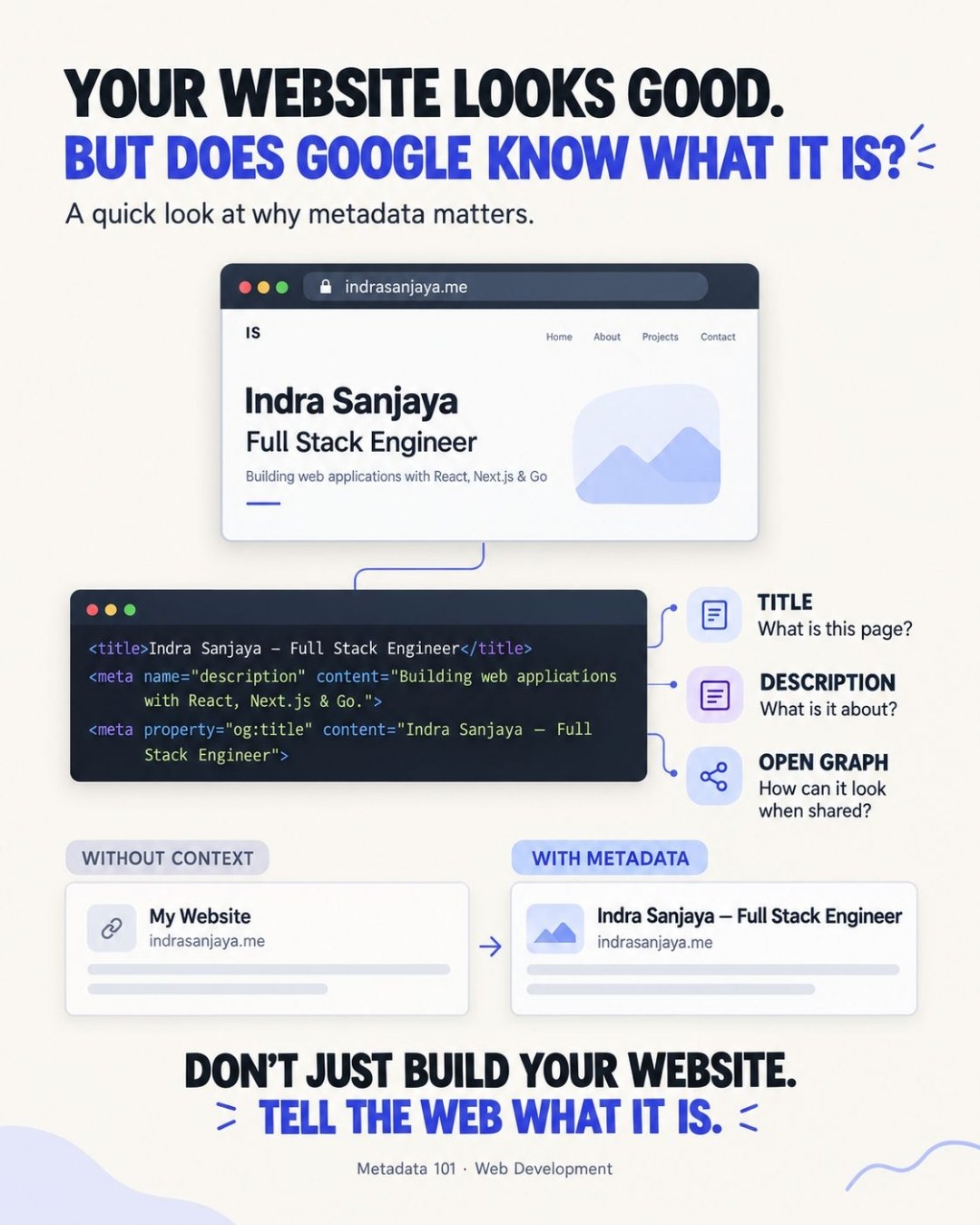
FIG. 01One Page, Three Readers
Your page is read by three very different audiences, and only one of them has eyes.
- Humans read the rendered UI: layout, copy, images.
- Search engines read the HTML to decide what the page is about, whether it's a duplicate, and what to show as a result.
- Crawlers and platforms (LinkedIn, Slack, X, WhatsApp, Discord) fetch the page to build a link preview, and generally do not run your JavaScript.
Metadata is the part of the page written for the second and third audiences. It lives in the <head>, invisible to visitors, and it is the only way to tell machines what your page is on purpose instead of letting them guess.
If you don't describe your page to machines, they will describe it for you, and they will not be flattering.
FIG. 02Where Each Signal Acts
"Metadata" is not one mechanism. Different signals act at different stages of a page's life, and mixing them up causes the most common mistakes.
A page is discovered (sitemap, links), crawled (fetched, subject to robots.txt), indexed (understood and stored), and finally displayed (as a search result or a link preview). The consequence worth memorizing: robots.txt controls crawling, not indexing. If you block a page there, the crawler never sees its noindex tag, and the URL can still appear in results. To keep a page out of the index, allow crawling and use noindex.
FIG. 03The Five Essentials
Title and meta description
The <title> is the headline of your search result and the label of the browser tab. Keep it specific and short enough to avoid truncation, roughly 50 to 60 characters. The meta description is your pitch underneath it. It doesn't directly influence ranking, and search engines may rewrite either one, but a clear description is what earns the click.
Google also ignores the old meta keywords tag. Skip it.
Canonical URL
The same content often lives at several addresses: with and without www, with tracking parameters, with a trailing slash. The canonical URL tells search engines which one is the primary version, so signals consolidate instead of splitting. It's a hint, not a command, and it must be set per page. A canonical set once in a shared layout points every page at the same URL, which is worse than having none.
Open Graph and Twitter Cards
Open Graph tags (og:title, og:description, og:image, og:url) control what platforms show when your link is shared. Use an absolute image URL at about 1200×630. Platforms cache previews aggressively, so after changing tags, re-scrape the URL with the platform's debugger (LinkedIn Post Inspector, Facebook Sharing Debugger).
Structured data
Structured data, ideally as JSON-LD, describes entities explicitly: this page is an Article, written by this Person, published on this date. It helps search engines interpret the page and can make it eligible for rich results, though it guarantees nothing.
FIG. 04Implementing It in Next.js
The App Router has a first-class Metadata API, so none of this requires hand-written <head> tags. Start with site-wide defaults in the root layout:
import type { Metadata } from "next";

export const metadata: Metadata = {
  metadataBase: new URL("https://example.com"),
  title: {
    default: "Your Name — Software Engineer",
    template: "%s | Your Name",
  },
  description: "One clear sentence about who you are and what you build.",
  openGraph: {
    type: "website",
    siteName: "Your Name",
    images: ["/og-image.png"],
  },
  twitter: { card: "summary_large_image" },
};
metadataBase lets you use relative paths everywhere else; Next.js resolves them to absolute URLs, which is what social crawlers need. Then override per page with generateMetadata, including the canonical:
import type { Metadata } from "next";

export async function generateMetadata({
  params,
}: {
  params: Promise<{ slug: string }>;
}): Promise<Metadata> {
  const { slug } = await params;
  const post = await getPost(slug);

  return {
    title: post.title,
    description: post.description,
    alternates: { canonical: `/articles/${slug}` },
    openGraph: {
      type: "article",
      title: post.title,
      description: post.description,
      publishedTime: post.publishedAt,
      images: [post.ogImage ?? "/og-image.png"],
    },
  };
}
One gotcha: nested metadata fields are merged shallowly. If a page defines openGraph, it replaces the layout's whole openGraph object, so repeat any fields (such as siteName) you still want.
Add structured data as a JSON-LD script, escaping < so content can never break out of the tag:
const jsonLd = {
  "@context": "https://schema.org",
  "@type": "Article",
  headline: post.title,
  description: post.description,
  datePublished: post.publishedAt,
  author: { "@type": "Person", name: "Your Name" },
};

export default function Page() {
  return (
    <script
      type="application/ld+json"
      dangerouslySetInnerHTML={{
        __html: JSON.stringify(jsonLd).replace(/</g, "\\u003c"),
      }}
    />
  );
}
Finally, the two files that guide crawlers, both generated by code in Next.js:
// app/robots.ts
import type { MetadataRoute } from "next";

export default function robots(): MetadataRoute.Robots {
  return {
    rules: { userAgent: "*", allow: "/" },
    sitemap: "https://example.com/sitemap.xml",
  };
}

// app/sitemap.ts
export default async function sitemap(): Promise<MetadataRoute.Sitemap> {
  const posts = await getAllPosts();
  return [
    { url: "https://example.com", lastModified: new Date() },
    ...posts.map((p) => ({
      url: `https://example.com/articles/${p.slug}`,
      lastModified: p.updatedAt ?? p.publishedAt,
    })),
  ];
}
FIG. 05Use Case: The Link That Looked Dead
A common scenario: you publish a portfolio project and share it on LinkedIn. The post gets views but almost no clicks. The preview is a gray box with a raw URL.
The diagnosis is always the same three checks. Is there an og:image with an absolute URL? Is og:title set, or is the platform falling back to a generic <title>? Was the preview cached before you added the tags? The fix is to add the tags, then force a re-scrape. The content didn't change; the page simply started introducing itself.
FIG. 06Use Case: Two URLs, One Page
You deploy a blog and discover the same article is reachable at /articles/post, /articles/post/, and /articles/post?utm_source=newsletter. Search engines see three candidates and have to choose, and ranking signals such as links get split between them.
A per-page canonical (alternates.canonical in generateMetadata) points all three to one address. Together with a sitemap that lists only the canonical URLs, you've told every crawler exactly which version counts.
FIG. 07A Quick Audit Checklist
Run through this on any page before you ship it:
| Check | Why it matters |
|---|---|
Unique <title> per page | Search headline and tab label |
| Meta description, ~150 characters | Snippet that earns the click |
| Canonical set per page, not in the layout | Prevents duplicate-URL dilution |
og:image is absolute, ~1200×630 | Reliable link previews |
robots.txt doesn't block pages you want noindexed | Crawling vs. indexing |
| Sitemap lists canonical URLs only | Faster, cleaner discovery |
| JSON-LD validates | Eligibility for rich results |
| Previews re-scraped after changes | Platforms cache aggressively |
Metadata is the cheapest work in web development with the longest tail. You write it once, and every crawler, every platform and every search result reads it forever.